

Most salaried Indians have no idea how much is sitting in their provident fund until they change jobs or need the money in a hurry. Since Sunday, finding out takes one WhatsApp message. You don’t need a password or a portal login, and you don’t have to visit an EPFO office.
The Employees’ Provident Fund Organisation (EPFO) launched a PF balance check on WhatsApp on 1 November 2026, its 74th Foundation Day. Here’s the official number, the exact steps, what to do if the OTP doesn’t arrive, and the three things worth checking once your balance shows up.
Quick answer
- EPFO WhatsApp number: +91 87964 41800. Send “Hi” from the mobile number registered with your UAN.
- What you can see: your PF balance, your last five transactions and your passbook. The chat also helps with PMVBRY (Pradhan Mantri Viksit Bharat Rozgar Yojana) requirements.
- How you log in: choose a language, pick a service and enter the OTP sent to your registered mobile.
- Other free ways: a missed call to 9966044425, an SMS to 7738299899, the UMANG app or the EPFO passbook portal.
- Never share your OTP, UAN password or bank PIN with anyone, even if they say they’re from EPFO.
What EPFO launched, and why it matters
Labour Minister Mansukh Mandaviya launched the service in New Delhi on 1 November. According to the Labour Ministry, members can now see their PF balance, their latest five transactions and their passbook through EPFO’s verified WhatsApp service. The aim is to cut down trips to EPFO offices for routine questions.
That’s a big deal for an organisation of this size. EPFO says it has about 8 crore contributing members and 85 lakh pensioners, and it manages a retirement corpus of nearly ₹32 lakh crore. As Mint notes, plenty of members struggle with the website, juggle several apps or forget their login. A chat on an app they already use removes that hurdle.
The same event brought two other changes. Inoperative PF accounts that are Aadhaar-verified and hold up to ₹1,000 will now be settled automatically, so the owner doesn’t have to file a claim. The ministry expects about one lakh accounts holding ₹5 crore to benefit. EPFO also said its average claim settlement time fell to 2.57 days in October 2026.
How to do a PF balance check on WhatsApp: 6 steps
Before you start, make sure your UAN (Universal Account Number, the 12-digit number on your payslip) is active and your current mobile number is registered with it. The OTP goes only to that number.
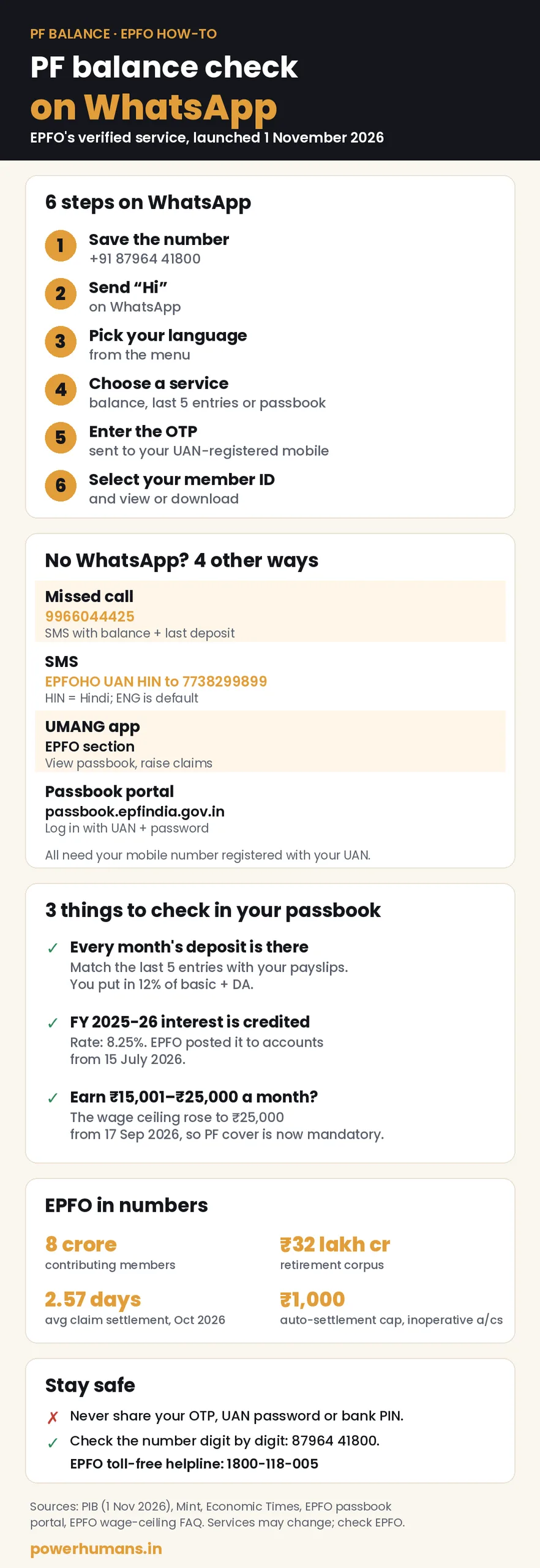
- Save the number. Add +91 87964 41800 to your contacts as “EPFO WhatsApp Services”. You can also search the number directly inside WhatsApp. EPFO has shared a QR code on its official social media accounts that opens the same chat.
- Send “Hi”. Open the chat and send a simple “Hi” to start the chatbot.
- Pick your language. The bot asks which language you prefer before it shows the menu.
- Choose a service. The menu lists PF balance, last five transactions and passbook download, plus an option to change your language.
- Enter the OTP. An OTP is sent to your UAN-registered mobile. Type it into the official chat only.
- Select your account. If you’ve worked at more than one company, pick the right member ID, then view your balance or download the passbook.
The “last five transactions” option is the most useful one for most people. It shows whether your employer has actually deposited the money cut from your salary in recent months.
EPFO WhatsApp service not working? Try this
The service is brand new, and Mint reported that some users had trouble getting OTPs or replies in the first couple of days. If it doesn’t work for you:
- Use the right phone. The WhatsApp account must run on the same mobile number that’s registered with your UAN. A new SIM won’t get the OTP until you update your number with EPFO.
- Wait and retry the OTP. Heavy traffic can delay messages. Give it a few minutes before you ask for a new one.
- Restart the chat later. If the bot stops replying, send “Hi” again after some time.
- Check your KYC. The SMS and missed-call services need at least one KYC detail, such as your Aadhaar, PAN or bank account, linked to your UAN. Getting your KYC sorted on the member portal fixes many problems with every service.
PF balance kaise check kare: 4 other ways that still work
If you don’t use WhatsApp, or the chat is slow, these older options still work. All of them are free.
1. PF balance check number (missed call)
Give a missed call to 9966044425 from your registered mobile. The call drops after two rings, and you get an SMS with your latest contribution and balance. EPFO lists this number on its passbook login page.
2. PF balance check by SMS
Send EPFOHO UAN to 7738299899 for a reply in English. Want it in Hindi? Send EPFOHO UAN HIN. Other codes include TAM (Tamil), TEL (Telugu), MAR (Marathi), BEN (Bengali), GUJ (Gujarati), KAN (Kannada), MAL (Malayalam) and PUN (Punjabi).
3. UMANG app
The government’s UMANG app has an EPFO section. There you can view your passbook, track claims and raise claims after an OTP login.
4. EPF passbook download online
Log in at passbook.epfindia.gov.in with your UAN and password to see every entry and download a PDF. One catch: if your employer runs its own exempted PF trust, the EPFO passbook may not show your balance. In that case, ask HR or the trust for a statement.
Keeping an eye on small sums is a good habit. Our guide on how to save money on groceries applies the same idea to your monthly budget.
Seen your balance? Check these 3 things
Looking at the total balance is only half the job. The entries behind it tell you whether everything is in order.
1. Is every month’s contribution there?
You contribute 12% of your basic pay plus dearness allowance, and your employer adds a matching amount, part of which goes to your pension account (EPS). Mint gives a simple example: if your basic pay is ₹30,000 and you contribute on the full amount, ₹3,600 should leave your salary for PF every month. Match the last five entries with your payslips. If a month is missing, ask HR first. If that doesn’t help, you can file a complaint on EPFO’s grievance portal, EPFiGMS.
Got a raise or a DA increase this year? Your PF deduction should have gone up with it. (Central government staff usually save through GPF or NPS rather than EPF. Here’s how the DA hike of 3 percent changes their salary and pension.)
2. Has the 2025-26 interest been credited?
The EPF interest rate for 2025-26 is 8.25%. This year EPFO credited it to all of its roughly 34 crore member accounts in one go on 15 July 2026, much earlier than the usual October–November, according to The Hindu. Interest is worked out on your monthly running balance but added once a year, so look for an interest entry dated July. If you closed an account before the credit, you may have missed that year’s interest. That’s one reason Mint advises against full withdrawals just after the financial year ends.
3. Earn between ₹15,000 and ₹25,000 a month?
From 17 September 2026, the wage ceiling for compulsory EPF, EPS and EDLI cover went up from ₹15,000 to ₹25,000 a month. The ceiling hadn’t changed since 2014. Under EPFO’s FAQ, employees earning up to ₹25,000 must now be enrolled, and both sides contribute on wages up to that limit. If you’re in that bracket and haven’t been enrolled since September, raise it with your employer. EPFO estimates the change brings more than 51 lakh additional workers under compulsory cover.

Is the EPFO WhatsApp number safe?
The number itself is official. Both the Labour Ministry and major newspapers have published +91 87964 41800 as EPFO’s verified WhatsApp number. The risk comes from copies. Fraudsters can set up look-alike accounts with an EPFO logo and send fake “PF claim” links. A few simple rules keep you safe:
- Type the number yourself, or scan the QR code from EPFO’s official accounts. Never use a number someone forwards to you.
- Enter the OTP only inside the official chat. Never read it out on a phone call.
- No one from EPFO needs your UAN password, ATM PIN or net-banking password. Anyone who asks for them is a fraudster.
- Don’t tap on links promising a “PF bonus” or a quick withdrawal. For help, call EPFO’s toll-free number, 1800-118-005, which is listed on its passbook page.
The same caution applies whenever money moves this season. Many bank branches close on different days this month, but digital payments keep running. Check the bank holidays in November 2026 before you plan a withdrawal or transfer.
What this means for your money
For many people, PF is their biggest pile of savings, earning 8.25% this year. A quick check every few months is free and catches problems early, like missed deposits, a forgotten old account or a wrong name. They’re far easier to fix when you aren’t rushing to withdraw.
If you also invest in shares or mutual funds, remember they’re taxed very differently from EPF. Our explainer on LTCG tax on shares and mutual funds covers the basics. For more practical money guides, browse our personal finance section, the Business category and what’s trending in India right now.
FAQ
What is the EPFO WhatsApp number for PF balance check?
It’s +91 87964 41800. Send “Hi” from the mobile number registered with your UAN, choose a language and a service, then enter the OTP.
Can I check my PF balance without UAN?
You don’t have to type your UAN for the missed-call service (9966044425) or the WhatsApp chat. Both work from your registered mobile. Your UAN still has to be active, and your mobile has to be linked to it.
Why am I not getting the OTP on EPFO WhatsApp?
The most common reason is that WhatsApp runs on a different number from the one registered with your UAN. Network delays during the first days of the launch are another. Wait a few minutes, try again, or use the missed-call or SMS service in the meantime.
How can I download my EPF passbook?
Choose “Download Passbook” in the EPFO WhatsApp chat. You can also log in at passbook.epfindia.gov.in or use the UMANG app.
What is the EPF interest rate for 2025-26?
It’s 8.25% a year. EPFO credited it to member accounts from 15 July 2026, and it should show as a separate interest entry in your passbook.
Can I withdraw PF on WhatsApp?
No. For now, the WhatsApp service covers your balance, recent transactions, passbook and PMVBRY guidance. Withdrawals and transfers are still filed on the member portal or the UMANG app.
The takeaway
Save +91 87964 41800, send “Hi” and spend two minutes checking that every month’s deposit and this year’s 8.25% interest are there. If anything’s missing, sort it out with your employer now rather than when you need the money. This article is for general information. For decisions about withdrawing, transferring or investing your PF, consult EPFO or a qualified financial adviser.
Related reads
- DA hike 3 percent: how much your salary and pension will rise
- LTCG tax cut news: how the 12.5% tax on shares and mutual funds works
- Bank holidays in November 2026: the full RBI list for your city
Sources
- PIB / Ministry of Labour & Employment: EPFO 74th Foundation Day, WhatsApp services and automatic settlement (1 Nov 2026)
- Mint: EPFO WhatsApp services number, step-by-step guide (2 Nov 2026)
- The Economic Times: EPFO WhatsApp service, how to check PF balance (2 Nov 2026)
- Moneycontrol: EPFO rolls out WhatsApp services, automatic settlement up to ₹1,000 (1 Nov 2026)
- EPFO Member Passbook portal (missed-call and SMS numbers, helpline)
- Mint: EPFO missed call and SMS services explained
- The Hindu: PF interest for 2025-26 credited to 34 crore accounts on 15 July
- Mint: EPF interest credit and what a delay means for your savings
- EPFO: FAQs on revision of the statutory wage ceiling to ₹25,000 (Sep 2026)
- Ministry of Labour & Employment: Enhancement of EPFO wage ceiling from 17 September 2026




Leave a Reply